Made for background work
No Android View, UIKit view, display server, or SDK-owned render loop is required.
Kotlin Multiplatform · Headless rendering
Rentile turns a supported map style and a list of XYZ coordinates into PNG bytes. It runs in shared Kotlin code, so previews, exports, background jobs, and native services can render a basemap without opening a screen or managing a graphics loop.
A focused rendering dependency
Full map SDKs are built around an interactive view. Rentile is for the other jobs: when all you need is a predictable image for known coordinates.
No Android View, UIKit view, display server, or SDK-owned render loop is required.
Prepare styles and request tiles from common Kotlin on Android, the JVM, iOS, macOS, and Linux.
Every successful tile comes back as encoded PNG bytes, ready to store or pass on.
Unsupported styles and resource problems fail with typed, redacted diagnostics.
Output examples
The examples below show the same XYZ tile rendered with three different styles. Each image is a 512×512 PNG returned through the same rendering API.
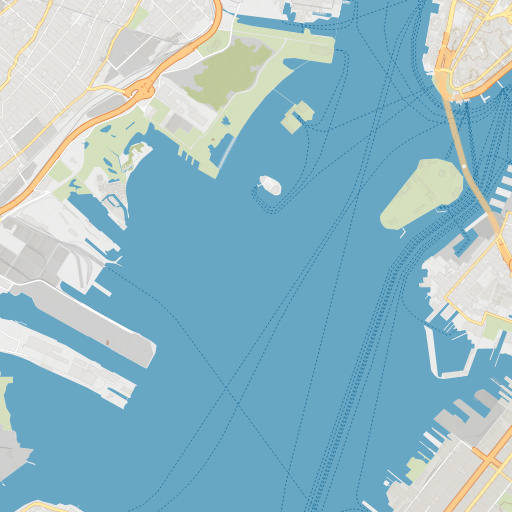
Vector fills, roads, shorelines, and route details encoded as a PNG tile.
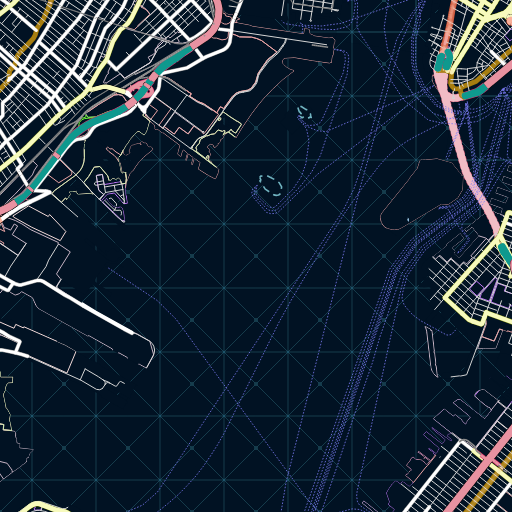
The same XYZ coordinate rendered with a contrasting vector style.
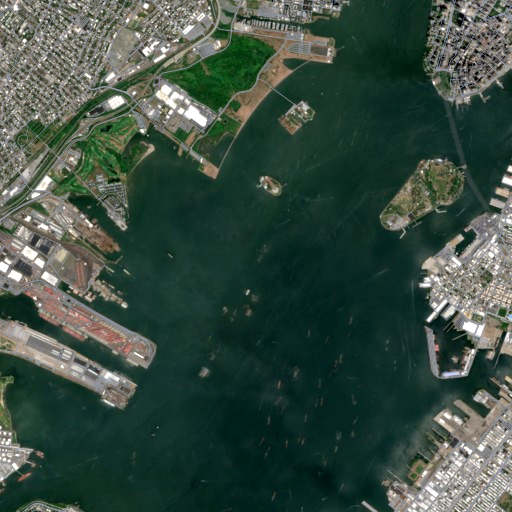
Raster imagery follows the same tile API and returns encoded PNG bytes.
Root project setup
Put this block in the root settings.gradle.kts.
dependencyResolutionManagement resolves ordinary Maven and KMP
coordinates such as Rentile. No consumer credentials are required.
dependencyResolutionManagement {
    repositories {
        maven("https://maven.rohittp.com")
        mavenCentral()
        google()
    }
}
Add it once
Declare Rentile in commonMain. Gradle selects the right native artifact
for each target in your project.
kotlin {
    sourceSets {
        commonMain.dependencies {
            implementation(
                "com.rohittp.rentile:kmp:latest"
            )
        }
    }
}The everyday flow
Resource access finishes before drawing begins. That gives your app a chance to check its own output cache before spending time rendering a tile.
Rentile checks the style against its versioned compatibility profile.
Required resources are fetched or read from the raw-resource cache.
Use the content keys to skip cached outputs, then render the remaining tiles.
Common Kotlin
Your app supplies transport and raw storage. Rentile handles preparation, bounded work, CPU drawing, and PNG encoding behind one closeable renderer.
AppResourceTransport and AppRawResourceStore below are
adapters implemented by your app.
val rasterizer = Rentile.create(
    RentileConfiguration(
        transport = AppResourceTransport(),
        rawResourceStore = AppRawResourceStore(),
    )
)

try {
    val style = rasterizer.prepare(
        StyleInput.Remote("https://example.com/style.json")
    )
    rasterizer.prepareBatch(
        style,
        listOf(TileId(z = 12, x = 2203, y = 1345)),
    ).use { batch ->
        val result = rasterizer.render(batch)
        savePng(result.tiles.single().pngBytes)
    }
} finally {
    rasterizer.close()
    rasterizer.awaitClosed()
}
A clear hand-off
Rentile owns the rendering machinery. Your app keeps the decisions that depend on product context, network policy, and user experience.
Is Rentile a fit?
Integration guide